Disclaimer: The information in this article is compiled by evisaflow.com from official publications and open internet sources for informational purposes only, and does not constitute formal travel advice. Travel information (including but not limited to visa regulations, entry policies, fees, and attraction schedules) is subject to change without notice. Please verify all details independently with the relevant official authorities before traveling. evisaflow.com assumes no liability for travel disruptions or losses resulting from reliance on this content.
Guide
Border & Entry
5 min read
How to Fill Out the Malaysia MDAC Arrival Card with eVisaFlow
Fill the Malaysia MDAC with eVisaFlow, then select your birthplace and check the departure country, default departure date and accommodation address.
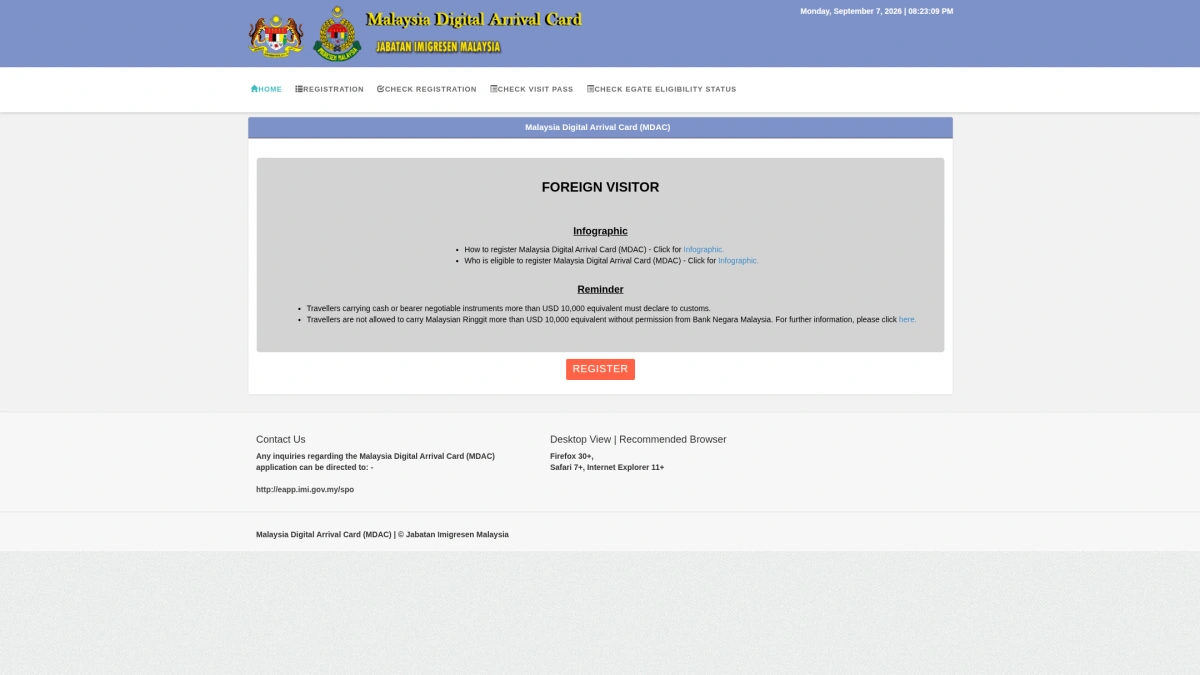
TL;DR: Open the eVisaFlow side panel on the official MDAC website, select a passport, and complete your trip, accommodation and contact details before clicking Auto Fill. The extension fills personal and travel information on the same page. Select Place of Birth manually on the official form. Check the departure country and default departure date, then complete the website's slider verification yourself before submitting.
This guide uses the eVisaFlow Southeast Asia Chrome extension to fill out the Malaysia MDAC arrival card on the official website. The screenshots use fictional passport and contact details for a Chinese passport holder flying from Thailand to Kuala Lumpur; enter your own details when completing the form.
For timing, field meanings and autogate rules, see the Malaysia MDAC form guide. This tutorial focuses on using the extension.
1. Open the MDAC website and the side panel
Open the official MDAC website. Click the eVisaFlow icon in Chrome's toolbar to open the side panel, then select Malaysia Arrival Card.
Enable Auto-enter form page to go straight to Registration when you open the website. If you leave it disabled, click Register on the website.
Initially, the page shows only name, passport number, date of birth and nationality. More personal and travel fields appear as the form is filled; you do not need to find a second form.
eVisaFlow Southeast Asia enters saved passport, trip, accommodation and contact details on the official MDAC website when you click Auto Fill.
2. Select a passport and check the side-panel details
Select the passport for this trip under Passport and check the name and number. To add a passport, use Data → Open Passport Management → Add Passport, then return to the official tab and select it.
Accommodation fields may already contain values. Replace them with your own booking details. Grey placeholder examples, meanwhile, are not saved values.
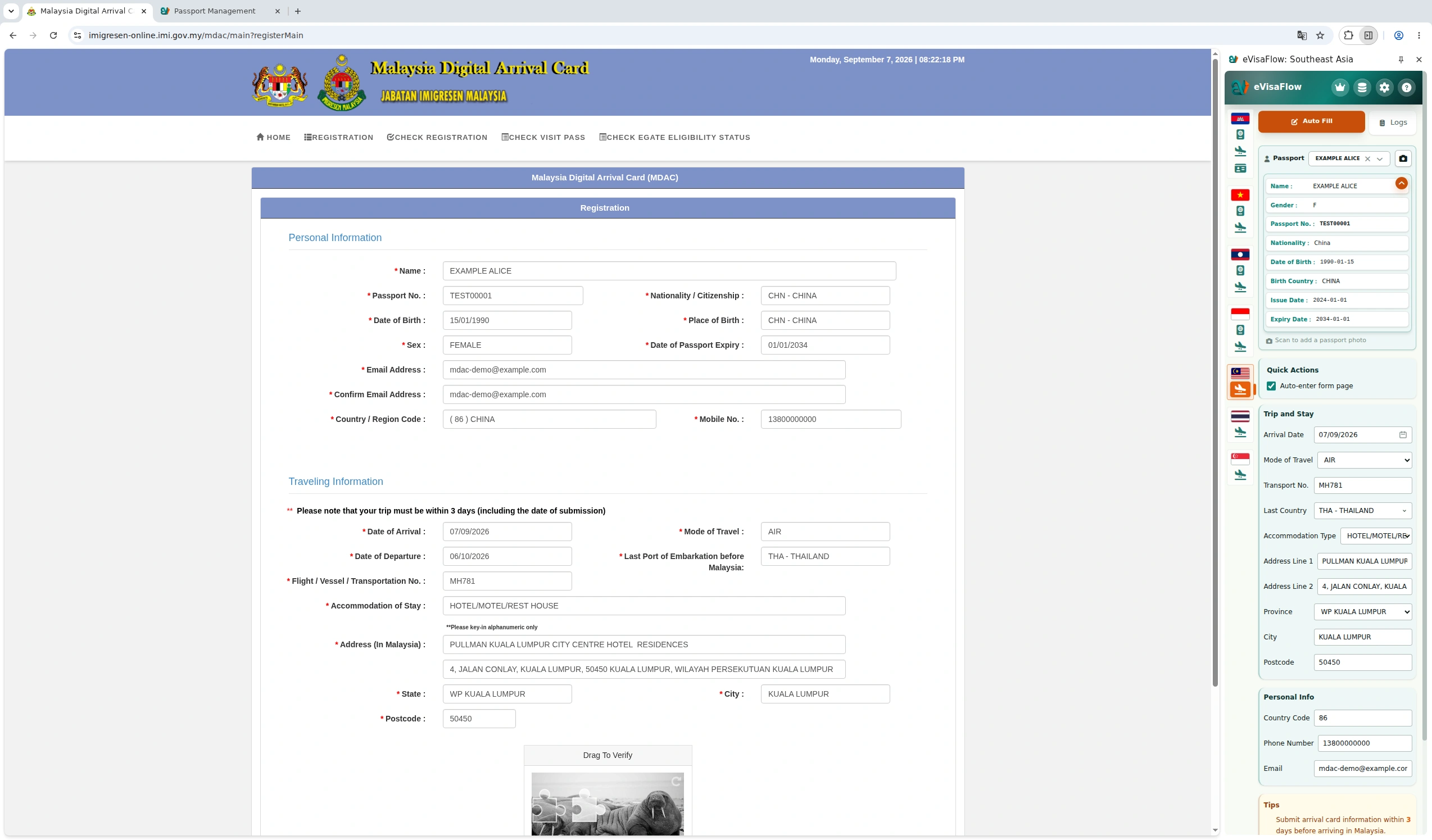
| Side-panel field | Example and what to check |
|---|---|
| Arrival Date | September 7, 2026; use your own arrival date |
| Mode of Travel | AIR; this tutorial only covers arrival by air |
| Transport No. | MH781; enter the complete flight number here |
| Last Country | THA - THAILAND; select where you depart from before entering Malaysia |
| Accommodation Type | HOTEL/MOTEL/REST HOUSE |
| Address Line 1 | Hotel name; the example uses PULLMAN KUALA LUMPUR CITY CENTRE HOTEL & RESIDENCES |
| Address Line 2 | Street address; the example uses the hotel's Jalan Conlay address |
| Province | WP KUALA LUMPUR, corresponding to State on the official form |
| City / Postcode | KUALA LUMPUR / 50450; use the details from your booking |
| Country Code / Phone Number / Email | Telephone country code, mobile number and an email address that can receive messages |
Check Last Country separately. Its default option is Default (Use Passport Nationality). The official field, however, is Last Port of Embarkation before Malaysia, asking where you depart from before reaching Malaysia. For example, if you hold a Chinese passport but fly from Thailand to Malaysia, select THA - THAILAND in the side panel.
3. Click Auto Fill, then select your birthplace
Keep the official Registration tab active and click Auto Fill in the side panel. The extension enters the following details:
- Name, passport number, date of birth, nationality, sex and passport expiry date.
- Telephone country code, mobile number, and both Email Address and Confirm Email Address.
- Arrival and departure dates, transport mode, flight number, departure country and accommodation details.
Select Place of Birth manually on the official form, even if Birth Country is already saved in your passport details. Choose CHN - CHINA if you were born in China. Use your actual birthplace, which can differ from your nationality.
4. Check dates, departure country and accommodation
The extension sets a default 30-day stay, counting the arrival date as day one. For example, an arrival date of 07/09/2026 gives a departure date of 06/10/2026. Change the departure date on the website if it differs from your itinerary. The extension's default does not establish your permitted stay.
If you are flying from Thailand, confirm that Last Port of Embarkation before Malaysia shows THA - THAILAND on the official form.
Check the complete accommodation address, state, city and postcode. For the hotel in this example, State should read WP KUALA LUMPUR, City KUALA LUMPUR, and the postcode 50450.
Check the hotel name as it appears on the official form. Characters such as the & in this example are removed during filling, so make sure the remaining text still identifies your accommodation accurately.
Use the screenshot below to compare the side-panel fields with the completed form, including the birthplace selected on the website.
5. Check your details and submit
Compare the completed form with your passport, flight and hotel bookings. Check that both email fields contain the same correct address.
Scroll to Drag To Verify / Slide the Puzzle at the bottom of the form and complete the slider verification. Then click Submit and follow the website's instructions.
If you notice an error after submission, see the SGAC and MDAC correction guide. Do not assume another country's arrival-card correction process applies to MDAC.
References
eVisaFlow tool
Filling official eVisa and arrival forms?
eVisaFlow helps you reuse passport details and reduce repetitive typing when you complete supported Southeast Asia eVisa and arrival forms.
Related Reading
Guide
Malaysia MDAC Form: Fields, Timing, Autogate, and Common Fixes
Complete Malaysia Digital Arrival Card (MDAC) registration on the official portal, check your confirmation, and verify Autogate eligibility before arrival.
Guide
SGAC or MDAC Mistake: Officially Verified Correction Steps
What the official Singapore and Malaysia systems actually let you do after entering the wrong passport, flight, or arrival details.
Guide
Crossing Between Singapore and Malaysia: Do You Need Both SGAC and MDAC?
SGAC and MDAC are separate systems from two governments, and neither replaces the other: which form each direction needs, exemptions, and the two 3-day windows.
Guide
Lost Passport in Malaysia: How to Get a Special Pass to Exit the Country
Losing your passport in Malaysia means you cannot leave on an emergency passport alone. Learn how to get a police report and the mandatory Special Pass (Pas Khas).